Building your SPA: from blueprint to running app
Last time you designed the intent. Today Claude Code builds it, and you stay the architect.
Today
- What a single page application is, and how to catch one in the wild
- Our stack: Node, npm, Vite, React, React Router. Who does what.
- Equip Claude Code: MCP servers and design skills
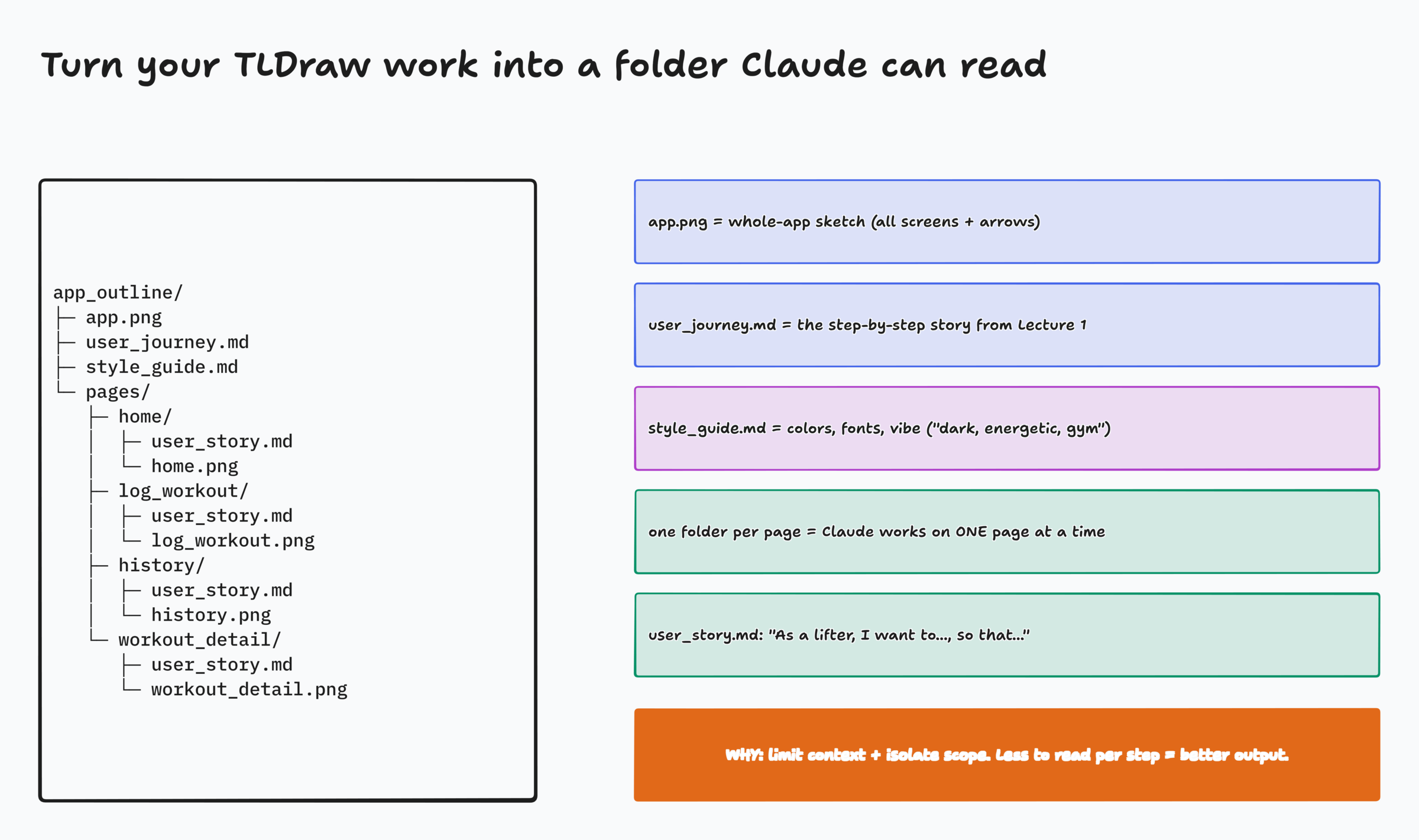
- Turn your wireframes into an
app_outline/and build in phases, live - Save it with git, and package it as a reusable sub-agent
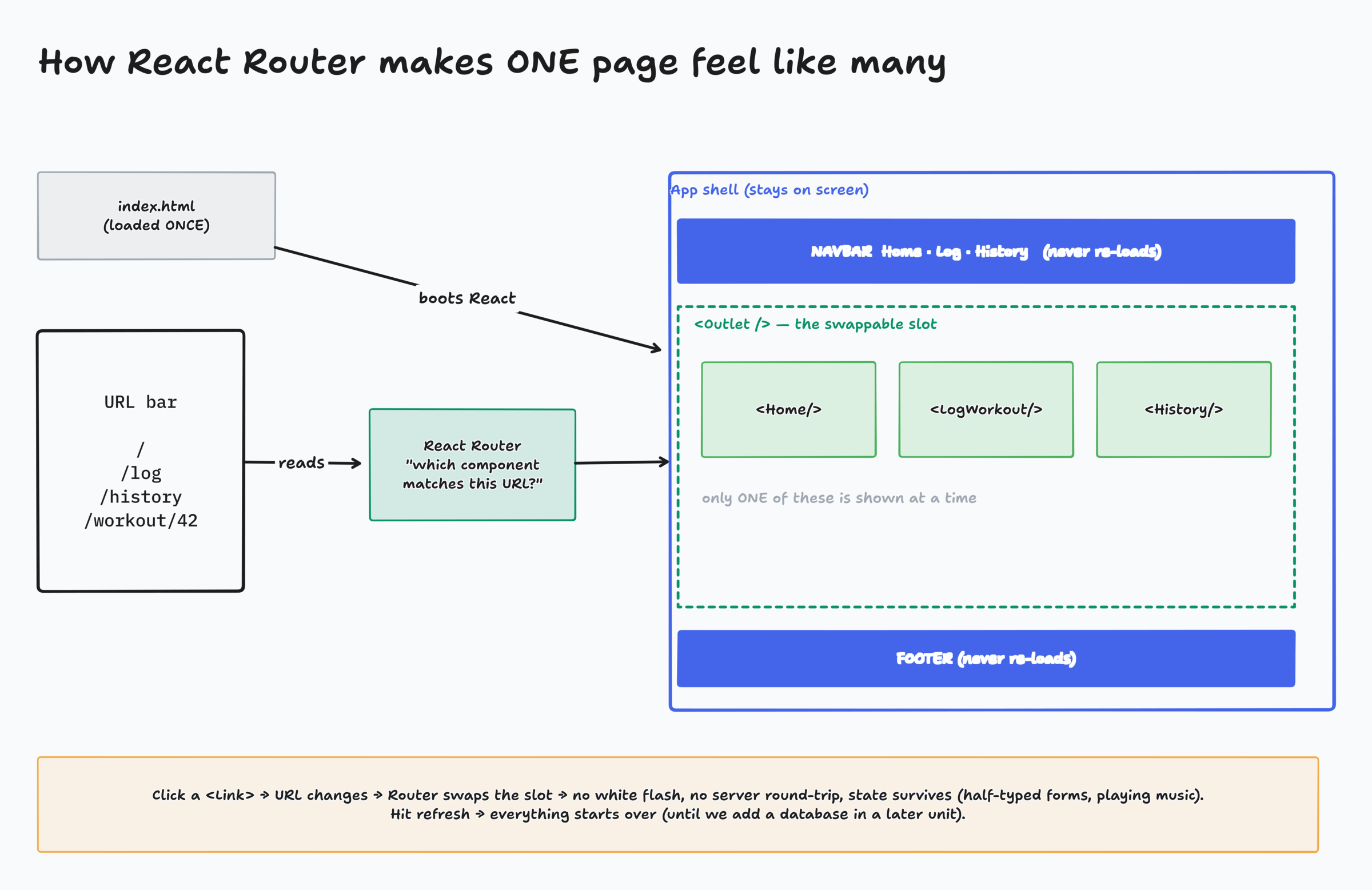
A single page application loads one HTML page once, then updates parts of it as you click
Traditional website
Every click asks the server for a brand-new page. The screen flashes, scroll resets, anything you typed is gone.
Single page app
The app loads once. Clicking swaps only the part that changed. Instant, smooth, and state survives.
Activity: SPA Detective
- Warm-up: the same radio site, built both ways. Watch the music timer.
- I visit real sites and click around
- In chat, on "go": SPA or TRAD?
- Then we check the evidence in DevTools
Page: activity-spa-detective/index.html
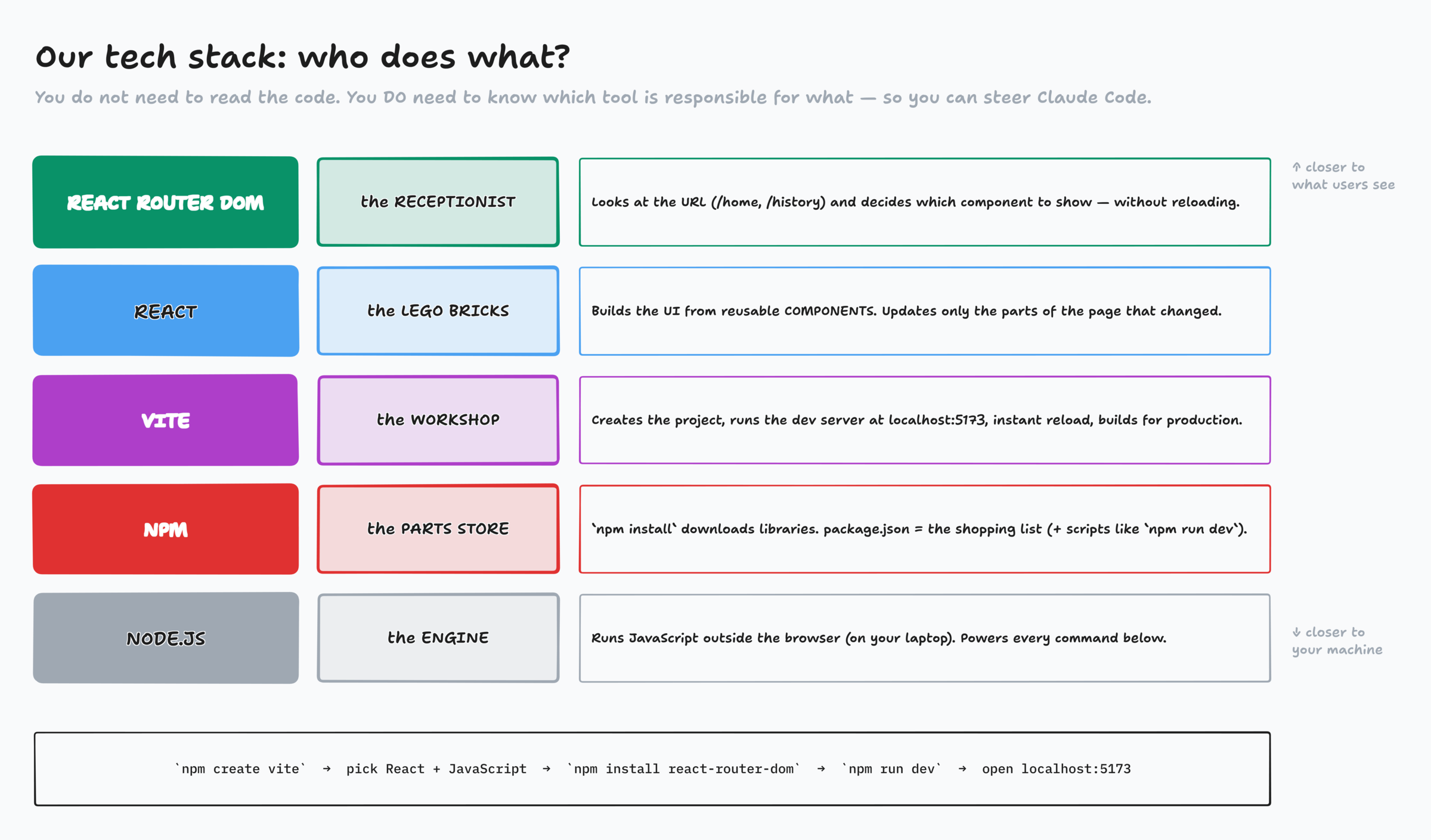
React builds the screen out of components
A component is a reusable piece of UI: a button, a workout card, a navbar.
Build a <WorkoutCard> once, use it on Home and History.
When data changes, React updates only that part of the page.
Not automatically "the best," but popular, flexible, huge ecosystem, and it pairs well with Vite and Router.
// a component is a function that returns UI
function WorkoutCard({ name, date }) {
  return (
    <div className="card">
      <h3>{name}</h3>
      <p>{date}</p>
    </div>
  )
}
Start the project: Vite does the scaffolding
npm create vite@latest
# Project name:    liftlog
# Framework:       React
# Variant:         JavaScript
# Linter:          Oxlint (either is fine)
# Install + start: No

cd liftlog
npm install
npm install react-router-dom
npm run dev
# → http://localhost:5173
Or just ask Claude
"Create a React + Vite project with react-router-dom using npm, named liftlog, and run it on the dev server."
Either way you get the same files. We won't deep-dive into them.
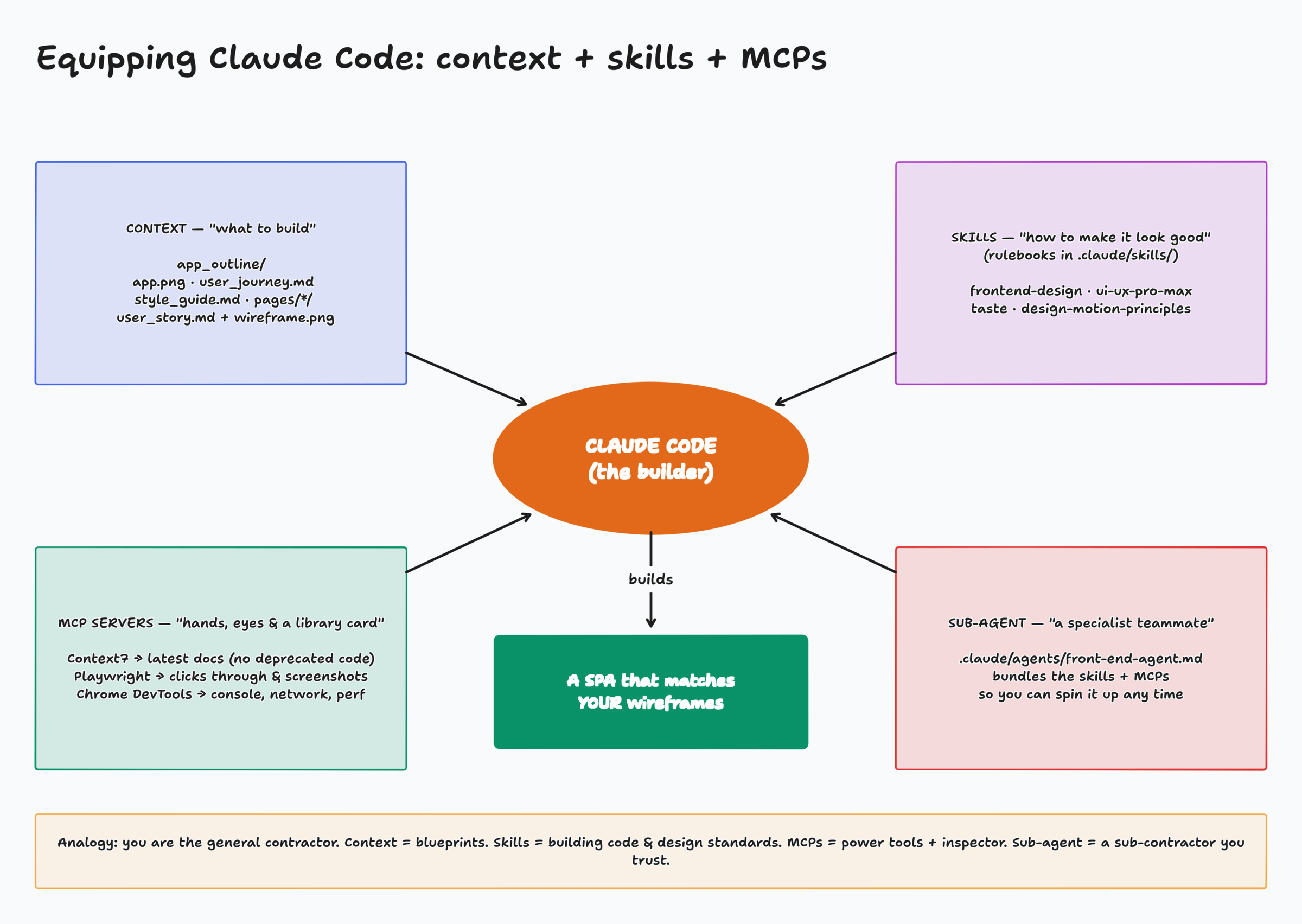
MCP servers give Claude abilities
Context7
Pulls the latest docs for our stack, so no deprecated functions.
Playwright
Drives a real browser: clicks, types, screenshots. It checks pages against your wireframes.
Chrome DevTools
Reads the console, network, and performance. Debugging beyond what's visible.
claude mcp add --scope user playwright      -- npx -y @playwright/mcp@latest
claude mcp add --scope user context7        -- npx -y @upstash/context7-mcp
claude mcp add --scope user chrome-devtools -- npx -y chrome-devtools-mcp@latest
# check:  claude mcp list
Skills are rulebooks that push Claude past generic AI design
- frontend-design: Anthropic's official skill. Distinctive type, palette, layout.
- ui-ux-pro-max: UI/UX rules, component patterns, responsive layout
- taste: dials for variance and density, bans the "AI slop" defaults
- design-motion-principles: easing, timing, micro-interactions
Install: the one-liner on the class site. Check: /skills
your-project/
├── .claude/
│   └── skills/
│       ├── frontend-design/
│       │   └── SKILL.md
│       ├── ui-ux-pro-max/
│       │   ├── SKILL.md
│       │   ├── data/      ← 70+ files!
│       │   └── scripts/
│       ├── taste-skill/
│       └── design-motion-principles/
│           ├── SKILL.md
│           └── references/
└── ...
The prompt: every part has a job
React + Vite, React Router with BrowserRouter
Name all four, so Claude uses them
No API. Data lives in the browser and refresh resets it.
Read user_journey → app.png → each page's wireframe + story → style guide
Use Context7 for current conventions
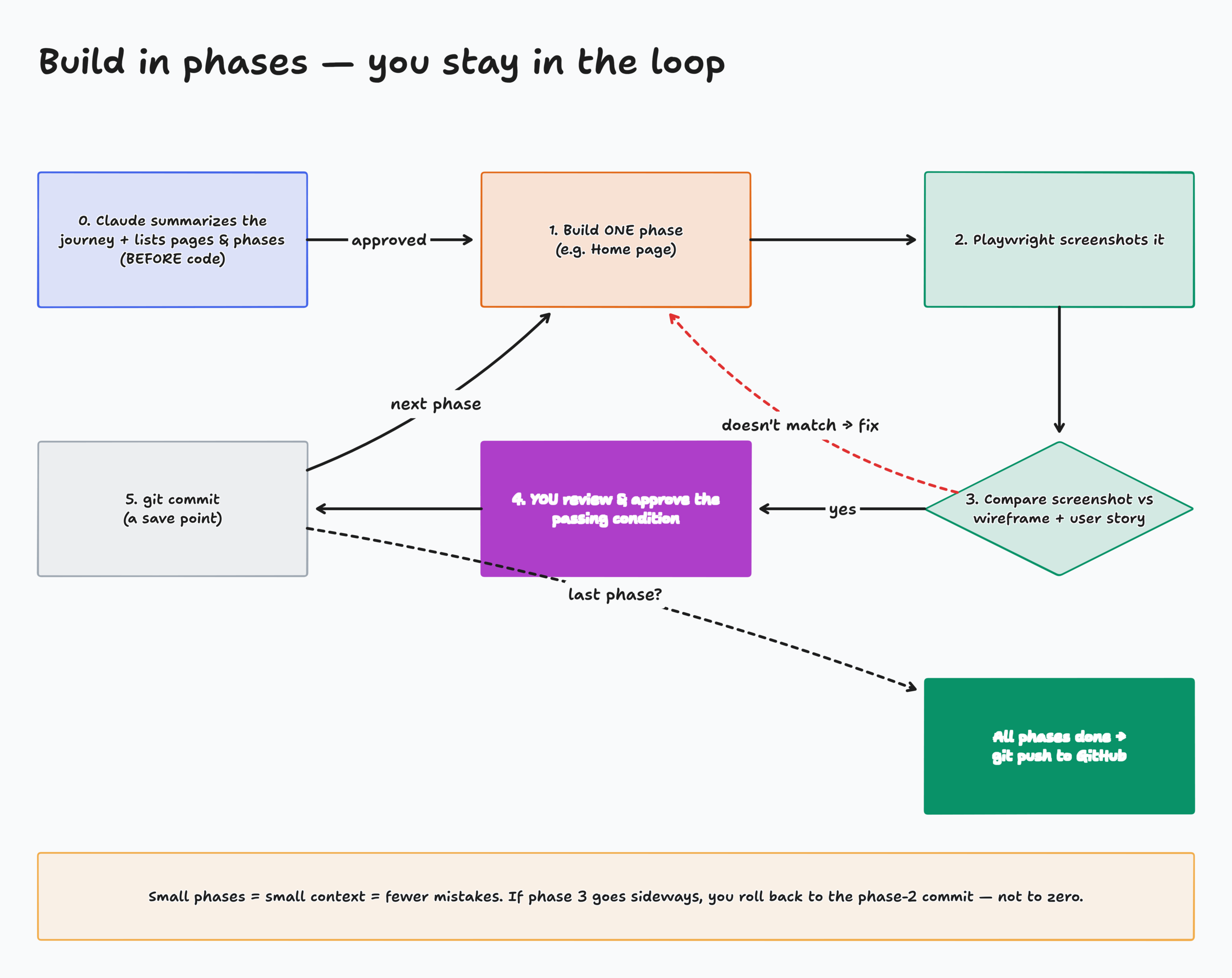
Playwright screenshot of each page, compared to its wireframe
Claude proposes phases + pass conditions. You approve each one.
Summarize the journey and list pages before any code
Full text: demo-kit/prompt.md. Paste it now and let Claude start.
Activity: Who's responsible? (while Claude builds)
- I show a problem you'll actually hit this week
- Type which tool is responsible: Node, npm, Vite, React, Router, an MCP, a skill, app_outline, git…
- Hit enter on "go." Then we reveal.
Page: activity-whos-responsible/index.html
Version control: every approved phase is a save point
# in Claude: save what it learned
/init                # writes CLAUDE.md

git init
git add -A
git commit -m "Phase 1: app shell + Home"

# create the GitHub repo and push
gh repo create liftlog --public --source=. --push
Why it matters
- Phase 3 broke everything? Go back to phase 2.
- Share your code with teammates and instructors
- Your Claude sessions come and go. The repo stays.
- CLAUDE.md is the first thing Claude reads next session
Package it as a front-end sub-agent
# .claude/agents/front-end-agent.md
---
name: front-end-agent
description: Builds, maintains, and tests React
  SPAs with responsive, accessible UI/UX.
model: sonnet
mcpServers:
  - context7
  - playwright
  - chrome-devtools
skills:
  - frontend-design
  - ui-ux-pro-max
  - design-taste-frontend
  - design-motion-principles
---
You are a Senior Front-End Engineer…
Set it up once, reuse it everywhere
A specialist teammate that already knows its skills, MCPs, and workflow: analyze → plan → implement → test → document.
skills: uses each skill's name. Taste's name is design-taste-frontend.
Homework, Part II
- Priority 1, build your app: turn your Part I planning into an
app_outline/and build the front-end SPA - Priority 2, FreeCodeCamp: 100 steps of the JavaScript certification
- Priority 3, Netflix clone: use Claude Code, skills, context, and MCPs to build your SPA
Checklist: skills folder ✓ · MCPs connected ✓ · app_outline ✓ · phases approved ✓ · pushed to GitHub ✓