UI Fundamentals: draw the blueprint before Claude builds
What a UI is, why it matters, and how to plan one so an AI can build it.
By the end of today you can
- Explain what a user interface is and why users judge your whole app by it
- Answer the 8 planning questions for any app idea
- Write a user journey, including what happens when things go wrong
- Sketch lo-fi wireframes in TLDraw that Claude Code can build from
Next lecture, Claude Code turns today's blueprint into a working app.
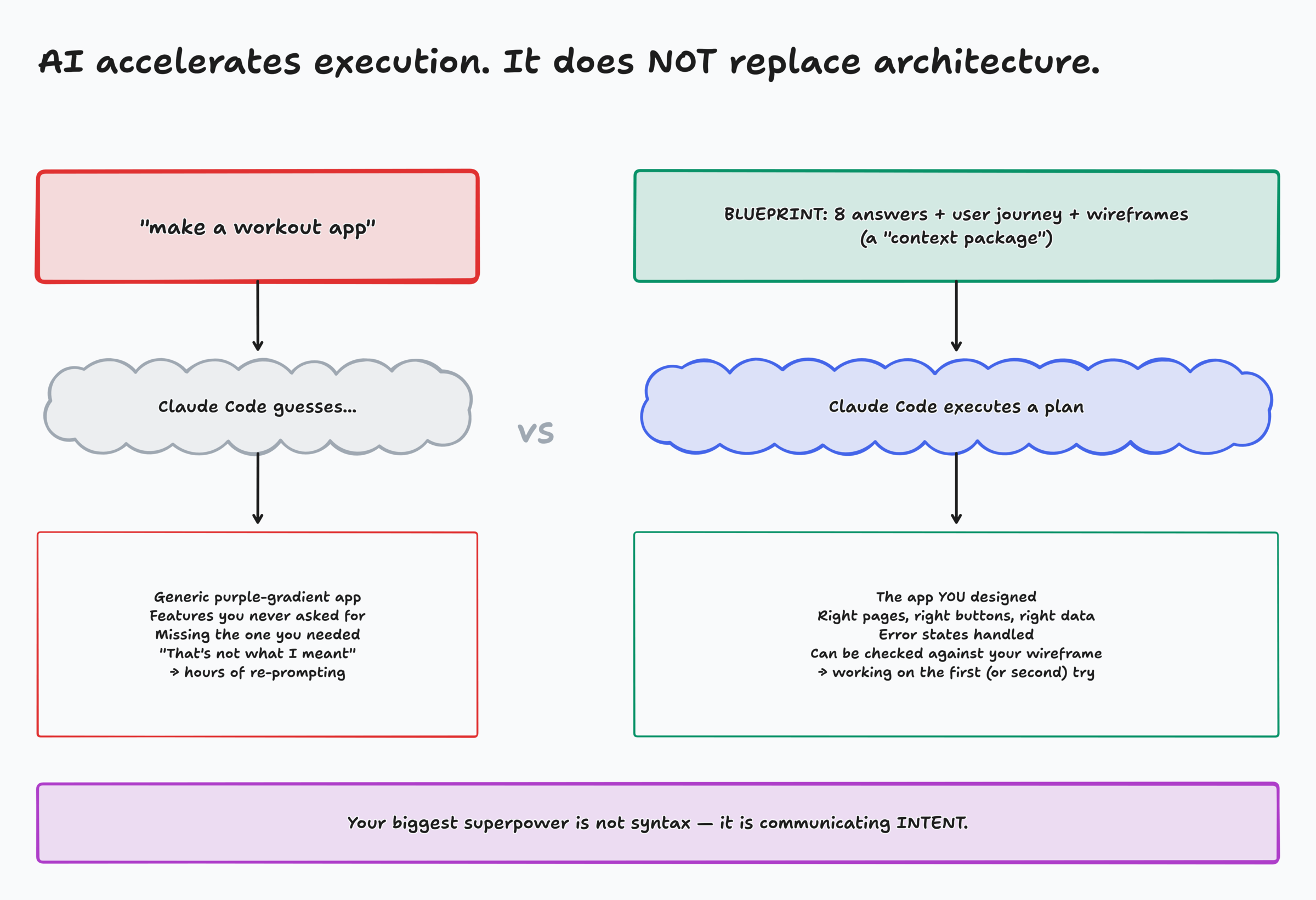
Claude Code can build almost anything. It can't read your mind.
Your superpower isn't syntax. It's communicating intent.
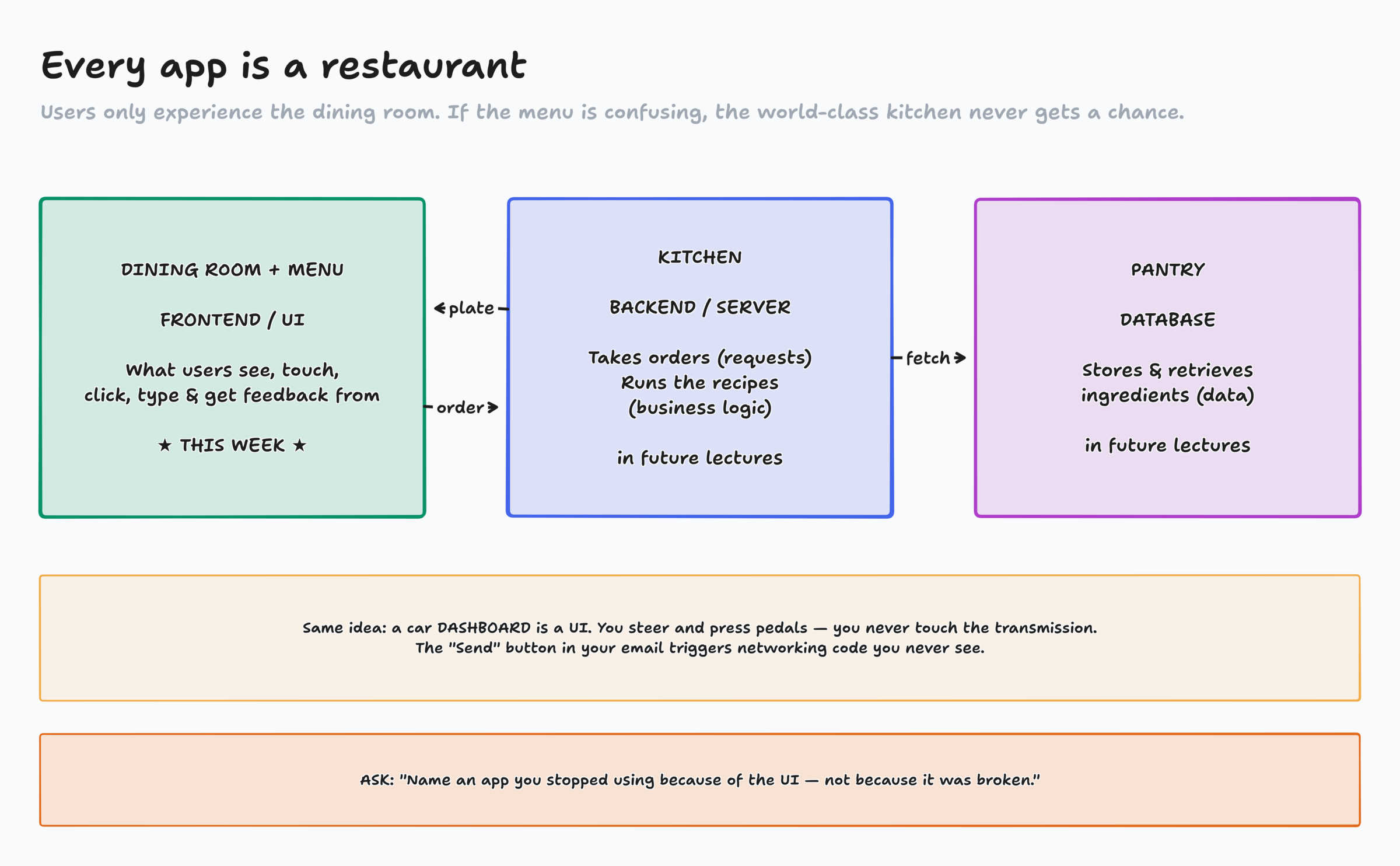
A user interface is everything a user can see, touch, click, type into, or get feedback from
- Buttons, menus, icons
- Forms, text fields, sliders
- Images and text
- Navigation
- Feedback: errors, toasts, spinners
It's a bridge
Computers speak code and data. People speak buttons. When you click Send on an email, you never write the networking code. The UI hides it behind one button.
Activity: UI Crime Scene
- I'm sharing a page with numbered exhibits. Each one is a tiny UI that commits a crime.
- Take the exhibit number I assign you. Click it, type in it, break it.
- In chat: #number: the crime + how you'd fix it
- Then I'll call on a few of you to make your case
Page: activity-ui-crime-scene/index.html
Every crime was a planning question nobody answered
"Error 0x8004"
What should happen when login fails?
Form wiped my input
What happens when validation fails?
Deleted with no warning
What actions can users take, and which can't be undone?
Blank list, no hint
What does a first-time user see?
Message vanished offline
What if the internet disconnects?
Unlabeled icons
What navigation exists on each page?
If you don't decide, Claude decides for you, or nobody does.
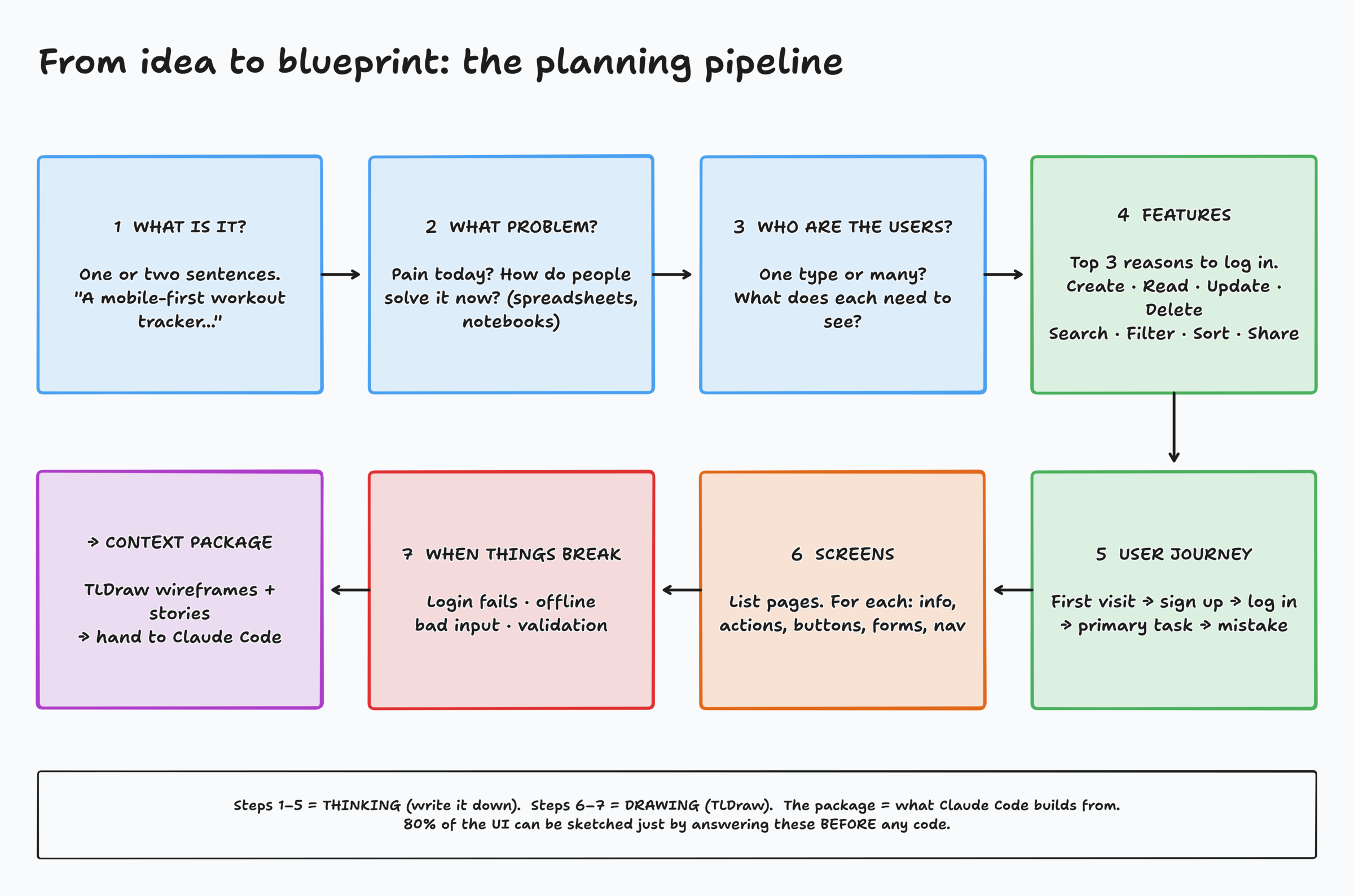
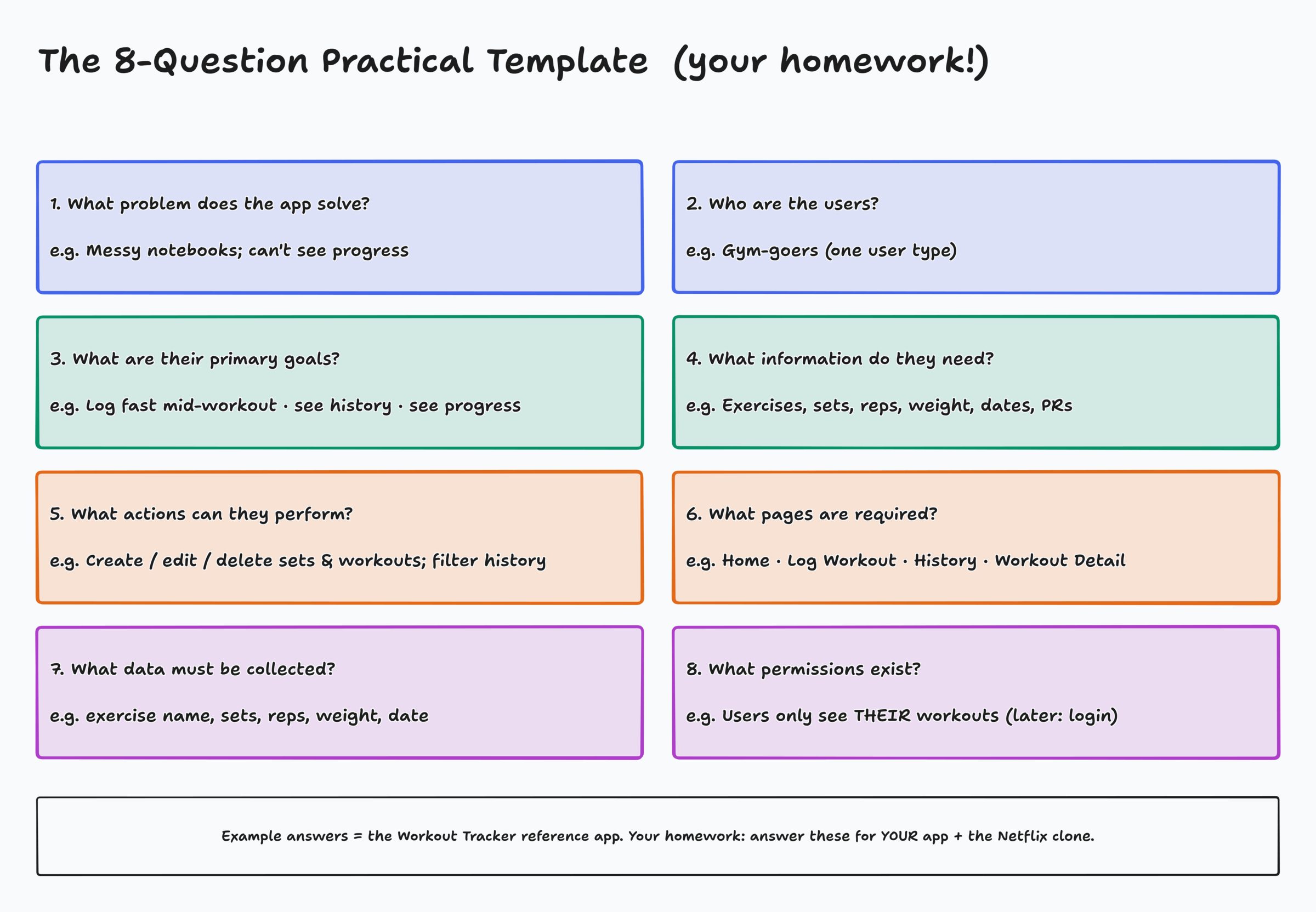
Identify your application
What is it? One or two sentences.
"A lightweight, mobile-first workout tracker that lets users quickly log exercises, sets, reps, and weight during a workout, and view their history over time."
What problem does it solve?
- Why would someone use it?
- What's frustrating about the current process?
- How do people solve it today?
Workout Tracker
Problem: "I log workouts in spreadsheets and notebooks. It's messy and I can't really track my progress."
Today: notebook, Notes app, memory
Who are the users?
- Who will use it?
- Is there more than one type of user?
- What is each one responsible for?
- What does each one need to see?
Different users, different interfaces
A food delivery app has 3 UIs:
- Customer: browse and order
- Driver: pickups and map
- Restaurant: incoming orders
Workout Tracker: one user, the lifter.
Clarify features: users don't care about your code, they care about finishing tasks
User goals
- What are they trying to accomplish?
- Top 3 reasons they open the app?
- What do they do most often?
- Which actions create value?
Workout Tracker, top 3
- Log a set fast, mid-workout
- See what I lifted last time
- See that I'm getting stronger
Information and actions: think CRUD
Create
Log a new workout or set
Read
View history and records
Update
Fix a typo in a set
Delete
Remove a set or workout
Also: search · filter · sort · export · share
And: what should users never see? (other people's data, passwords, admin tools)
Every major action usually becomes a feature, and usually a button.
Write the user journey: the step-by-step story of using your app
What happens when a user…
- first visits?
- signs up / logs in?
- completes their main task?
- makes a mistake?
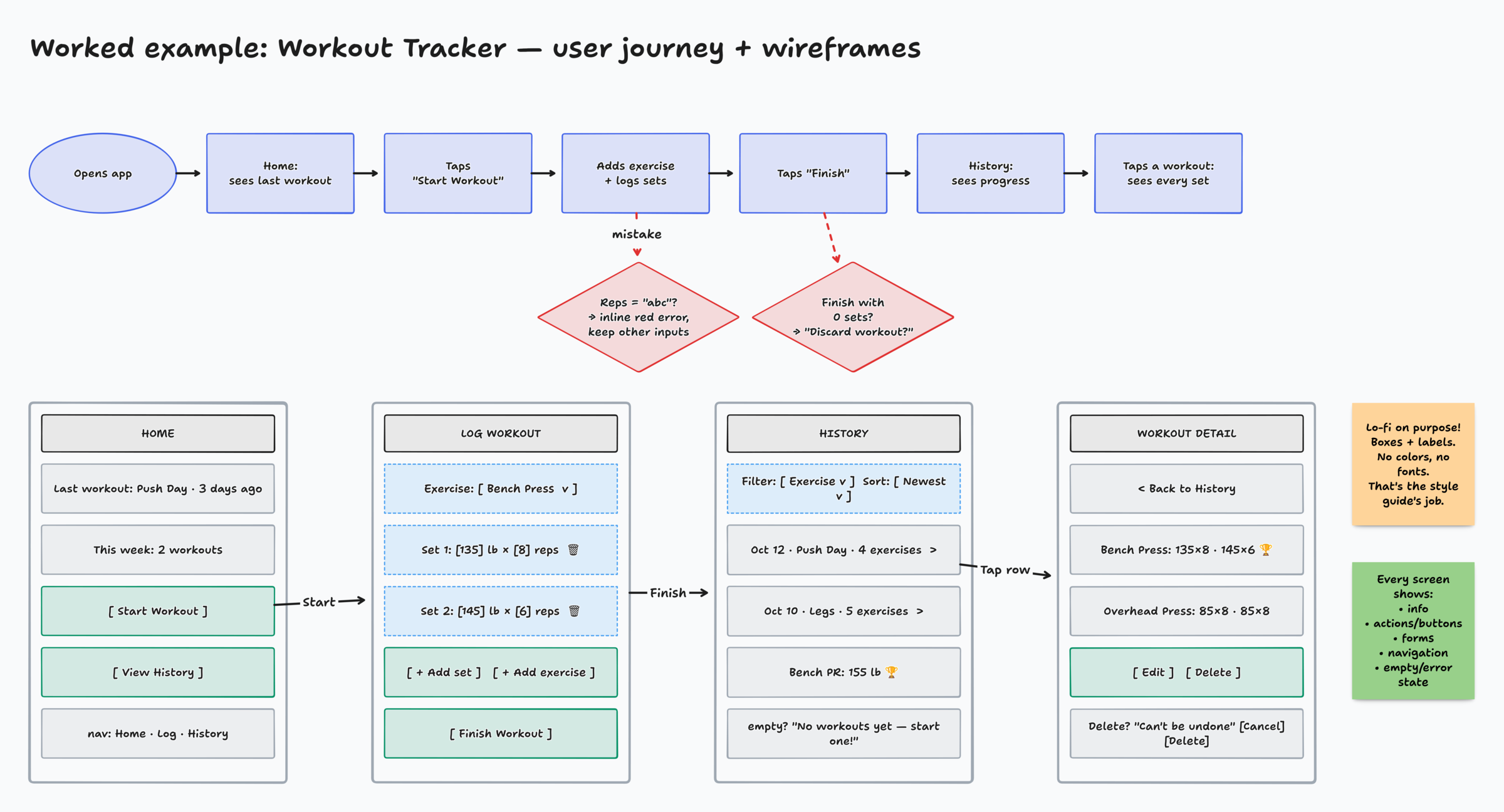
- Opens app → sees last workout
- Taps Start Workout
- Picks exercise, logs sets
- Types "abc" for reps → red hint under the field, nothing else cleared
- Taps Finish → lands on History
Now draw it: screens in TLDraw
List your screens
Home · Dashboard · Profile · Settings · Search results · Details · Reports · Admin
For each screen
- What information appears?
- What actions, buttons, forms?
- What navigation?
TLDraw in 30 seconds
Rrectangle ·Aarrow ·Ttext ·Nsticky noteCtrl/⌘ Dduplicate a screen- Drag an arrow from one screen to another for navigation
- Boxes and labels only. No colors, no fonts.
- Save the
.tldrfile and export PNGs. You'll need them next lecture.
What should happen when something goes wrong?
- Login fails
- Internet disconnects
- Form validation fails
- Payment fails
- User enters invalid data
- The list is empty
The most-skipped step
Beginners only design the happy path. Real users mostly live on the unhappy paths.
Write the error state onto the wireframe itself: what it says and what the user can do next.
AI accelerates execution. It doesn't replace architecture.
Your TLDraw sketches and user journey are the context package Claude Code needs. Designing the intent is the real engineering work.
Homework, Part I
- Priority 1, your own app: pick an idea, open TLDraw, answer the 8 questions, write your user journey/stories, sketch every screen
- Priority 2, FreeCodeCamp: 50 steps of the Python certification
- Priority 3, Netflix clone: same planning process: 8 questions, journey, wireframes
Set yourself up for next lecture
- Save your
.tldrfile - Export one PNG per screen plus one of the whole app
- Write one short user story per page: As a…, I want to…, so that…
Next time these become an app_outline/ folder Claude builds from.